Posts

Setting up Visual Studio Code for Haxe Development - Hello World on Mac
Image
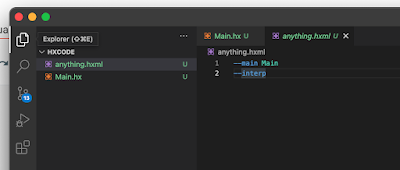
Was thinking of doing some game development after 6 years. Got a lot of hope seeing how Haxe and OpenFL seemed to provide solutions for old AS3 projects. But just to get the Haxe 'hello world' running on VS Code on my Mac wasn't documented anywhere. So I'm writing it here hoping it helps some others. First install Haxe on your Mac (normal installer). I didn't know how to use the binaries alone. Get VSCode Install the Haxe and Lime extensions on VSCode. Open a new project folder, create a file called Main.hx. Paste the code given from this page . Next create a file with .hxml extension in the same folder and paste two lines of code shown in the screenshot below. (more info ). Click 'Run without debugging' See the output in the debug console below (not terminal or output tab) Next I'm off to getting an entire old AS3 project with SWF assets working. If I succeed I'll post more.
Unfamiliar place to search for solutions when your code doesn't work

Image
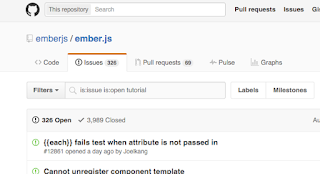
When our code doesn't work as expected, we usually do one thing. Google. On Google the first few answers are usually from stackoverflow.com, blogs or forums. But there are times when even Googling doesn't help. If the code or project you are dealing with is open-source. A great place to look for and get answers is the 'Issues' section on Github. In my case, I was wondering why mirage in ember.js tutorial wasn't working well for me. All I had to do was go to Ember.js on Github and navigate to Issues tab. Then search for the keyword 'tutorial' Booyah! I found my answer instantly. P.S. If you don't find existing questions, just open a new issue and you will get much better answers as it comes from the creators.

DoTween - The Big Demo

Image
I love DoTween , and have been using it extensively at work and personal projects, ever since I heard of it. Tweens are a great and cheap way to get a polished look for all transitions and animations in your game or mobile app. Stop coding movement by hand for menu items, HUDs, simple translations etc. if you are still doing it. So I made a small 2d demo in Unity5 with DoTween, where you can play with different types of tweens, including an option to choose a different tween for different axes (X and Y) Its open-source btw, and you can play with the code yourself on github . Click to open the unity web player in new tab (Firefox, Safari recommended) If Chrome blocks, follow instructions . Easing is an important component of making your games and interactive experiences Juicy. If you don't know what Juicyness is watch this amazingly cool super awesome video of two game developers showcasing their demo.

10 productivity tips to not give up on your game project

Image
These tips are not just for game development, this applies to almost anyone who wants to create stuff and can apply to any project in your life. ExtraCredits is a really good youtube channel for anyone who is interested in making games. Today I saw this video on their GameDesign playlist . It gave some amazing tips as listed below. This is just a summary for those crazy people who prefer reading instead of watching videos, like me :) 1) Don't plan a project that will take you more than a month This is a great point. After years of having dropped projects, prototypes and trying to do too many things, or everything that excites me at the moment. I guess this is a must follow. 2) Its gonna take you more than a month, if you plan for a month. Haha, yes, so true. But don't panic, but if you hit 3 months, its time to revisit. 3) Don't spend too much time designing Don't spend too much time designing stuff you don't know if you can build yet. Experience is w...

Game development live blogging - Part 2

Image
Alright yesterday I left a body-less snake alone in Part 1. Today I am going to make it attach with its body, and have you test-drive the snake in the editor, even in "Edit mode"... Fancy! I know, that's one of the strength's of Unity3d's editors. Recap : So far, in the editor, edit mode, I am able to drag the snake's head GameObject, and snap it to the grid. Now its time to link them together. Usually in the past, I always hold them all in a single array like data structure and keep updating their position using code, by shifting their position data from head to body 1, and body 1 to body 2 and so on. This time I am going to try a new approach. Let's do it the Unity3d's way. First I am going to declare a new variable called "nextPart" of type SnakePart. I realised, each part's responsibility is only to pass its old position to the next body part. This will be a chain effect and the entire snake will move. Also we never use th...

Application could not be verified, when installing app to iPad Air

Solution : Delete the existing app on the device and try again. Note : You don't have to do this all the time. It happens only when a version of the app is installed from the AppStore or from an Ad-hoc source like Testflight. I hadn't seen this error before, but it happened to me on XCode - version 6.3.1 (6D1002) with an iPad Air. But around the internet it seems to happen to iPhone 6 and 6 Plus too.

Game development live blogging - Part 1

Image
I'm starting a project called "Snake On Acid" using Unity3d engine. Its the classic old Nokia snake game, but with all the game development magic I have learnt so far in my career. It is going to have what I believe are some interesting time based twists, amazing sound and flashy graphics with lot of juicyness! Much in line with super hexagon's style. Lets start.. I have setup a basic project with some graphics inspired from Neave snake. I hope to change the graphics later. I have a "gameboard" background graphic object (with sorting layer : background), a snake game object with three snake body objects (sorting layer : foreground) and a main camera object. Oh I also have Demigiant's DoTween plugin added to the Unity project. There's going to be some amazing tweening :) Now to make the snake move, but with some tween magic. I am going to focus only on the head snake object and attach a script to the body. Body part will be a prefab, and w...

Dependency Injection - Simplest tutorial ever!

I have been hearing about Dependency Injection often. So I googled and found this very useful post by James Shore. The article begins with the below excerpt. When I first heard about dependency injection, I thought, "Dependendiwhatsit?" and promptly forgot about it. When I finally took the time to figure out what people were talking about, I laughed. "That'sall it is?" "Dependency Injection" is a 25-dollar term for a 5-cent concept . That's not to say that it's a bad term... and it's a good tool. But the top articles on Google focus on bells and whistles at the expense of the basic concept. I figured I should say something, well, simpler. Read the rest of the article here

Storing and retrieving AS3 'Class' in SharedObjects

I recently wanted to store and retrieve AS3 Classes in SharedObjects. This could be particularly useful when dealing with an embedded resource. The key functions which help you achieve this are  getQualifiedClassName &  getDefinitionByName

Bejeweled, Candy crush like Match-3 game clone source code jam

Image
Today I had to make an assignment for this company I had applied for. After passing round 1, the second round was an assignment. The task was to make a clone of Bejeweled which auto-plays itself, until no more matches can be made. The game can be stopped using a button or when no more matches are available. When it is stopped either way the user can click on any 3 gems to convert it to a wildcard gem. So the game can be played forever without any end. The whole thing took about 5 hours, with about 40 mins break in between and few other miniature breaks. I have always wanted to participate in game jams and make a time lapse video, so I took this opportunity and made one. Also I am giving away the source code on Github. It is made with Starling framework using AS3, so it should be portable to iOS, Android, Mac, Windows and Web without any hassles. Screenshot Play online Click here to play the game online (hosted on my Dropbox) https://dl.dropboxusercontent.com/u/1389278/...

What are the best fonts for programming ?

Good page with example and screenshots. I am about to try Ubuntu Mono. http://www.slant.co/topics/67/~what-are-the-best-programming-fonts

Testing your Flash AS3 games simulating slow internet connection

Flash IDE used to have an option where you can test your flash movie with different kinds of modem speeds. It was very useful to see how loading external resources worked, for testing some funky pre-loaders I made back in those days. Today I had to test my AS3 game which I coded with Flash builder 4.6. Finally after some work managed to test the preloader I created based on this article . Here are the steps I followed (Works only for Windows, tested with Chrome) 1. You need a web server. I didn't want to download and install anything huge. So search for a portable as small as possible web server and found something called MicroApache. = Download it from here = (click File > Download after the page loads) Then run it by clicking on go.bat after extracting it somewhere, anywhere. Test it by typing http://localhost:8800 If that link gets taken down in the future you have other alternatives http://httpd.apache.org/ http://www.aprelium.com/downloads/ http://www.brsweb...

Porting my AS3 game (engine) to Starling

Image
I started working on my first Indie game really long ago. Probably even before Stage3d was announced. But my day job kept me busy and the development happened only on and off. Here are a few details about it - Has a resolution of 720 x 480 (3:2 aspect ratio, had old iPhone screens in mind) - Not based on Blitting like Flixel does. I used the display list. - A lot of procedural artwork with AS3 filters, but with cacheAsBitmap enabled. - Heavy usage of  'Graphics' class, to create the elements via code. - Also has usual PNG frame animated graphics. Having worked on Robokill for the iOS, I got to read a lot of the original AS3 code. But little did I realize that even though that game had a resolution of 800 x 600, had lot of graphics and still ran smoothly, that game was designed in such a way that not the entire screen needed to be redrawn each frame. It never had parallax scrolling backgrounds, or full screen effects. It was written with a home-grown AS3 game engine a...

I really want you to not believe where my site is hosted on

Image
Finally my first website is up. With my limited web development skills and a lot of help from around the internet, close friends and my dear sister it took me about 1.5 days to go from  ==> ** References ** Beautiful-css-centered-menus-no-hacks-full-cross-browser-support Customizing-and-styling-google-forms Sincere thanks to Tallman , Ashwin and my sister for their tips about typefaces and content organization. Check it out now - www.rajavanya.com

Been cooking this for a long while now..

Image
It all began 2 years ago :P

You haven't seen the Stack overflow calendar yet?

Image
Today while on my SO profile page , I accidentally clicked on their "visited" statistics. (They have a few badges for people who come to the site regularly like 'for n consecutive days' and so on) And then to my surprise I found a neat calendar view of all the days. Though not very useful or anything. It was kinda cool and surprising to see how much my life/career has become dependent on stackoverflow.com

Water Effect on HTML5 Canvas

Was bored, so made the water effect based on this article  on a HTML 5 canvas. Canvas seems promising, but far from flash performance yet.  

Flixel - first impressions and what can 'Unity3d' learn from it

Disclaimer : This purpose of this article is not to criticize the author of Flixel, rather to help new developers to get an idea of Flixel, its architecture and what to expect from it. I still believe it is a great library for making certain types of games very quickly and very good for prototyping certain game ideas, if not the best. If you have been trying to make flash games in your free time, there is no way you haven't heard of Flixel. Canabalt's release also popularized the engine quite a bit. I dabbled with Flixel a few weeks ago for a small weekly prototype marathon we had at work. Me, being the usual awesome self, decided to go with a library that I haven't worked with before for the marathon. So it began. Good, Bad Stuff First of all Flixel's 'features' page is pretty amazing on their website. Multiple cameras for a 2d game, built-in simple physics/collision system, particle engine, game save/load and even a feature to record and replay demos. Wo...

Jailbroken development with iOS 5.0.1 and XCode 4.2

Image
There is a lot of scattered information out there, so I am going to confirm this is going to work only for the specific configuration given below. Configuration details XCode version = 4.2 (BUILD 4D199 - But any build of XCode 4.2 should work) MAC OS X = 10.7.2 iOS 5.0.1 (9A405) Jailbroken iPod Touch 4th Gen (and has Cydia on it) How to start developing with XCode without iPhone developer account ? First is to disable CODESIGN (read code-sign). Make a copy of this file on Desktop (Because finder won't allow you to edit in the same folder) /Developer/Platforms/iPhoneOS.platform/Developer/SDKs/iPhoneOS5.0.sdk/SDKSettings.plist Open that file in TextEdit and change the following values from YES to NO. So it looks like below <key>CODE_SIGNING_REQUIRED</key> <string>NO</string> <key>ENTITLEMENTS_REQUIRED</key> <string>NO</string> Now restart XCode and set Code Signing Identity to Don't Code Sign...

Lets learn pixel shaders - Chap 2 - Basics

Image
Important - To move forward open another tab in your browser and open the URL  http://www.iquilezles.org/apps/shadertoy/ , I will refer to this tab simply as 'Shader Toy' Chapter 2 - Basics of pixel shader with 'Shader toy' Let us write some code, switch to the shader toy and notice that the " Deform " shader is already loaded and is running by default. On the right side bottom you see the source code, and on the left is the rendered effect. Take some time to notice the various details/controls shown to you like 1) fps , time, play/pause button, restart button on top of render area (place where the effect is played). 2) Dimensions panel - Width and height of the render area on top it. You can change it if you want. 3) The textures passed to the pixel shader are given right to the width/height box. You can pass up to 4 textures and use them in the pixel shader. The texture used in deform shader is given in the box 'unit 0'. Copy paste that UR...